Characters

Aniya

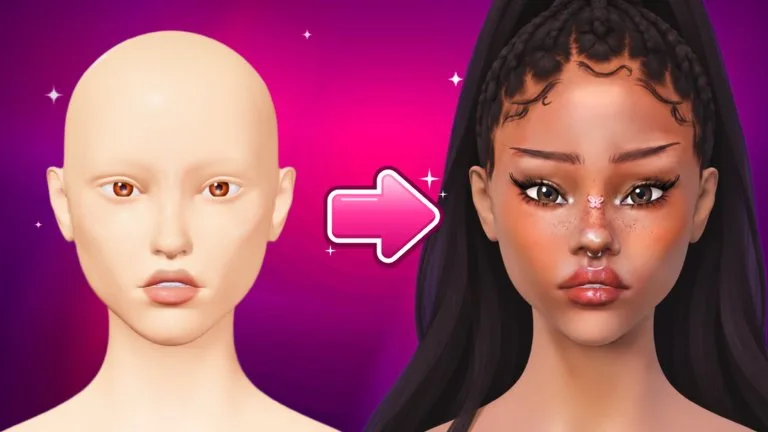
A free head base. Makeup, lashes, and piercings fit it, and the choice is remembered. Confirm costs, drop rates, and unlocks in the live Facecard: Makeup Showdown [⭐UPD] experience.

Aniya

Fan wiki for Facecard: Makeup Showdown on Roblox. Learn the round loop, brushes, head bases, Sculpt, Lookbook, voting, ranks, and where codes are redeemed.

What is Aniya?

Aniya is a free face in the STYLE tab, listed with Classic and Mina. The Help Center does not publish a special ability or a price for Aniya.

Published facts

Aniya facts
FactValue
HubCharacters

How do you get Aniya?

Free for everyone under STYLE, then Head.

How do you use Aniya?

Use it as your painting canvas. It stays selected when a new contest round clears the makeup. Load a Lookbook look made on Aniya if you want that face in Freeplay.

FAQ

Facecard: Makeup Showdown [⭐UPD] roster questions

Is Facecard: Makeup Showdown free?

Yes. The experience is free to play on Roblox. VIP, the More Layers pass, the 2x Earnings pass, cash packs, reaction packs, and the extra-time button are optional Robux purchases.

How do you win a round?

Paint the shared theme, then get the highest average star rating from the other players. A tie goes to the look with more votes. You have to have painted in that round to place.

Are there working codes right now?

The shop has a code button, and new codes are shared on the game Discord. No code string was published in the Help Center, and this wiki does not list guessed codes.

How many head bases are there?

The Help Center lists three free head bases: Classic, Aniya, and Mina. Your pick is remembered. Makeup, lashes, and piercings fit every base. Face shape is a separate Sculpt setting.

Does my makeup stay for the next round?

No. Every round starts on a clean bust. Only your chosen head base stays. Load a Sculpt preset if you want your saved face shape back, and load a Lookbook look in Freeplay rather than in a contest round.

Can I play on a phone?

Yes. On a phone or tablet, one finger on the face paints, a drag on the background turns the head, and a pinch zooms. Stamps are placed by holding, sliding, then lifting.